Türkçe
 English
 فارسی
 Русский
 Defne
Quick Summary – VPCs and Network Isolation
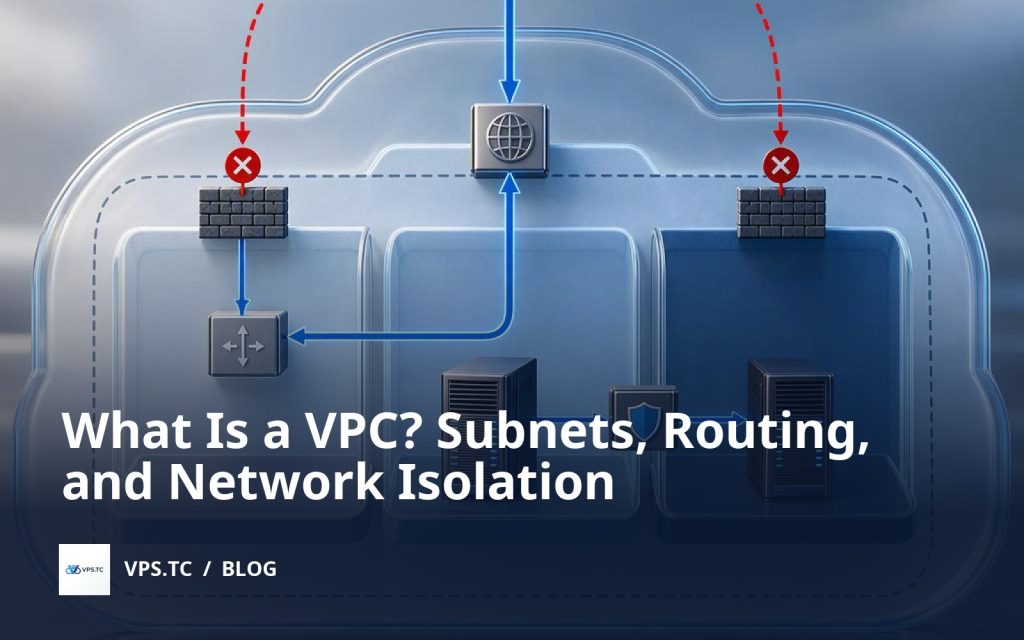
A VPC is a logically separated virtual network for cloud resources; it does not mean dedicated physical servers or traffic encryption. Address planning, routing, security rules, and administrative permissions jointly determine isolation.
- Region and placement — An AWS VPC is regional; each subnet resides in a single Availability Zone.
- Private address plan — The hypothetical lab allocates three /24 subnets within 10.20.0.0/16, each providing 251 usable IPv4 addresses after AWS reservations.
- Routes define separation — Public-egress has a default route to an Internet Gateway, private-app routes through a NAT Gateway, and isolated-data has only the VPC-local route.
- Access between tiers — Inbound TCP 5432 on the data tier is allowed only from the application security group; the application's TCP 8080 port is not exposed to the internet.
- Verified access boundaries — A connectivity matrix tests application access to the data tier and internet, plus blocked access from the internet to private instances and from the data tier to the internet.
- Billable resource checks — When closing the lab, check EC2, NAT Gateway, Elastic IP, and any enabled logging or analysis resources separately.
Two servers cannot reach each other merely because they share a cloud provider. A VPC is a logically separated virtual network where resources use private addresses. Building an isolated cloud network requires nonoverlapping CIDR blocks, separate subnet routes, and security rules that restrict access; a VPC alone provides neither encryption nor physical hardware separation.
Table of Contents
- Sharing a Cloud Does Not Mean Sharing a Network
- CIDR Planning: Public, Private, and Isolated Subnets
- Creating the VPC and Subnets with AWS CLI
- Where Does a Packet Go? Internet Gateway, NAT, and Route Tables
- Routes Enable Connectivity; Security Rules Restrict It
- Verifying Isolation with a Connectivity Matrix
- Closing the Lab: Costs, Dependencies, and the Next Architecture
- Checks Before Starting and Closing the Lab
- Frequently Asked Questions
- Sources
Sharing a Cloud Does Not Mean Sharing a Network
Two accounts’ EC2 instances in the same AWS Region cannot reach each other’s private IPs merely because they share a provider. Proximity is not permission. Separate private networks need an explicit connection, suitable routing, and rules permitting traffic. Communication through a publicly accessible service takes a different path; it does not merge those networks.
What is a VPC? A logically isolated virtual network within AWS whose address space, subnets, and routing you configure. Account boundaries do not define it: one account can have multiple VPCs, while VPCs across accounts can communicate through explicitly configured connections. The permitted network path matters, not the shared provider.
I keep three concepts separate: network isolation, hardware allocation, and encryption. A VPC is not a private cloud deployment model, does not itself provide dedicated physical servers, and does not guarantee encrypted traffic. Sensitive data still needs transport protection such as TLS.
In this hypothetical lab, the VPC uses 10.20.0.0/16 in eu-central-1. AWS VPCs are regional; each subnet occupies one Availability Zone. The public-egress, private-app, and isolated-data subnets all sit in eu-central-1a. Different traffic roles do not spread them across three zones or provide resilience against an Availability Zone failure.
IETF RFC 1918 reserves 10.0.0.0/8 for private use, including the lab’s addresses. These are not public addresses reserved for documentation. Private addressing does not replace access control. The application machine at 10.20.10.10 and data-tier machine at 10.20.20.10 receive no public IPv4 addresses, but routing and security rules still govern their traffic. Sharing a VPC does not require unrestricted access.
Who can change the network? Where can packets travel, and which connections are permitted? IAM addresses the first question, route tables the second, and security groups and network ACLs the third. The vpc-lab profile uses AWS IAM Identity Center authentication for management operations; it does not automatically permit application TCP connections. In your deployment plan, record management permissions and data-traffic permissions as separate checks.
CIDR Planning: Public, Private, and Isolated Subnets
Naming a subnet public does not expose it to the internet. Routes decide. For this hypothetical AWS lab, I would leave gaps between the three /24 subnets inside 10.20.0.0/16, reserving space for future tiers without renumbering existing machines.
RFC 1918 reserves 10.0.0.0/8 for private networks; our addresses belong there, not to documentation-only IPv4 blocks. RFC 4632 describes CIDR’s slash number as the prefix length in bits: /16 covers 65,536 addresses; /24 covers 256. What Is CIDR? A Practical Guide to IP Range Calculation explains the calculation for other prefixes.
| Network | CIDR | Location | Purpose and route |
|---|---|---|---|
| VPC | 10.20.0.0/16 |
eu-central-1 |
Shared address space |
| public-egress | 10.20.0.0/24 |
eu-central-1a |
Public NAT Gateway with an Elastic IP; default route to the Internet Gateway |
| private-app | 10.20.10.0/24 |
eu-central-1a |
Test machine: 10.20.10.10; default route to the NAT Gateway |
| isolated-data | 10.20.20.0/24 |
eu-central-1a |
Test machine: 10.20.20.10; VPC-local route only |
AWS reserves the first four and last addresses in standard IPv4 subnets. For private-app, those are 10.20.10.0, 10.20.10.1, 10.20.10.2, 10.20.10.3, and 10.20.10.255. Each /24 leaves 256 − 5 = 251 assignable addresses. This is an AWS reservation, not an RFC 4632 capacity rule. It does not guarantee room for 251 EC2 machines: managed services and additional network interfaces consume addresses too.
Each subnet gets its own route table. Neither test machine receives public IPv4, and naming a subnet public does not assign public addresses. isolated-data has no default internet route, but its local route reaches other VPC subnets. Isolated does not mean unreachable within the VPC. Security rules restrict access separately.
Do not size CIDRs solely for today’s machines. Compare your company network, home VPN, and future peering or Transit Gateway connections. RFC 1918 permits address reuse across organizations; connecting those networks can expose overlaps. VPC peering rejects overlapping CIDRs; overlaps also complicate direct routing through VPNs and Transit Gateway.
One Availability Zone simplifies the lab, not high availability. Reserve non-overlapping blocks for a second zone in your production plan now; unplanned allocations can turn the next network connection into a renumbering job.
Example
The hypothetical AWS lab uses three subnets in eu-central-1a: 10.20.0.0/24 for public-egress, 10.20.10.0/24 for private-app, and 10.20.20.0/24 for isolated-data. These belong to RFC 1918 private address space, not public address blocks reserved for documentation. Using one Availability Zone simplifies the lab; it does not provide high availability.
Creating the VPC and Subnets with AWS CLI
Creating a network in the wrong account can succeed. I check identity first. This hypothetical lab assumes Ubuntu Server 24.04 LTS, AWS CLI v2, and EC2 API 2016-11-15; managed VPC has no separate product version.
Preconfigure vpc-lab for AWS IAM Identity Center with EC2 network-management permissions. Bash authenticates through SSO without writing permanent access keys. Verify the displayed account, role, and region before entering EVET at the preserved Turkish prompt. Region: eu-central-1; availability zone: eu-central-1a.
IETF RFC 1918 identifies 10.20.0.0/16 as private address space, not public documentation space. Using RFC 4632’s CIDR notation, three /24 prefixes define separate subnets. JSON requests stay under /home/ubuntu/vpc-lab/config/.
(
set -euo pipefail
umask 077
export AWS_PROFILE=vpc-lab
export AWS_REGION=eu-central-1
export AWS_DEFAULT_REGION=eu-central-1
export AWS_PAGER=''

mkdir -p /home/ubuntu/vpc-lab/config
cd /home/ubuntu/vpc-lab/
if [[ -e state.env ]]; then
  printf 'state.env mevcut; yeniden oluşturma durduruldu.\n' >&2
  exit 1
fi

aws sso login --profile "$AWS_PROFILE"
aws sts get-caller-identity --output json
printf 'Bölge: %s\n' "$AWS_REGION"
read -r -p 'Hesap, rol ve bölge doğruysa EVET yazın: ' ONAY
[[ "$ONAY" == EVET ]] || exit 1

printf 'export AWS_PROFILE=%q\nexport AWS_REGION=%q\nexport AWS_DEFAULT_REGION=%q\n' \
  "$AWS_PROFILE" "$AWS_REGION" "$AWS_DEFAULT_REGION" > state.env

cat > config/vpc.json <<'JSON'
{
  "CidrBlock": "10.20.0.0/16",
  "TagSpecifications": [{
    "ResourceType": "vpc",
    "Tags": [
      {"Key": "Name", "Value": "vpc-lab"},
      {"Key": "Project", "Value": "vpc-lab"}
    ]
  }]
}
JSON

VPC_ID=$(aws ec2 create-vpc --cli-input-json file://config/vpc.json \
  --query 'Vpc.VpcId' --output text)
printf 'VPC_ID=%q\n' "$VPC_ID" >> state.env
aws ec2 wait vpc-available --vpc-ids "$VPC_ID"
aws ec2 modify-vpc-attribute --vpc-id "$VPC_ID" \
  --enable-dns-support '{"Value":true}'
aws ec2 modify-vpc-attribute --vpc-id "$VPC_ID" \
  --enable-dns-hostnames '{"Value":true}'

while read -r NAME CIDR KEY; do
  printf '{"VpcId":"%s","CidrBlock":"%s","AvailabilityZone":"eu-central-1a","TagSpecifications":[{"ResourceType":"subnet","Tags":[{"Key":"Name","Value":"%s"},{"Key":"Project","Value":"vpc-lab"}]}]}\n' \
    "$VPC_ID" "$CIDR" "$NAME" > "config/$NAME.json"
  SUBNET_ID=$(aws ec2 create-subnet \
    --cli-input-json "file://config/$NAME.json" \
    --query 'Subnet.SubnetId' --output text)
  printf '%s=%q\n' "$KEY" "$SUBNET_ID" >> state.env
  aws ec2 wait subnet-available --subnet-ids "$SUBNET_ID"
  aws ec2 modify-subnet-attribute --subnet-id "$SUBNET_ID" \
    --no-map-public-ip-on-launch
done <<'SUBNETS'
public-egress 10.20.0.0/24 SUBNET_PUBLIC_ID
private-app 10.20.10.0/24 SUBNET_PRIVATE_ID
isolated-data 10.20.20.0/24 SUBNET_ISOLATED_ID
SUBNETS

aws ec2 describe-subnets --filters "Name=vpc-id,Values=$VPC_ID" \
  --query 'Subnets[].{ID:SubnetId,CIDR:CidrBlock,AZ:AvailabilityZone,AutoPublicIPv4:MapPublicIpOnLaunch}' \
  --output table
)
Expect three rows showing subnet IDs, CIDRs, availability zone, and AutoPublicIPv4=False. AWS-generated IDs are saved immediately from creation responses. Successful modification commands may produce no output; silence proves nothing.
Name distinguishes resources; Project=vpc-lab supports filtering. DNS resolution and DNS hostname support are explicitly enabled, without providing internet access. Automatic public IPv4 assignment is disabled across all three subnets. No EC2 instances are created yet; future test machines 10.20.10.10 and 10.20.20.10 will also have no public IPv4.
AWS creates the VPC’s main route table, default security group, and default network ACL. Subnets initially use the main table implicitly, including its VPC-local route. The default security group permits inbound traffic from the same group and all outbound traffic; the default ACL permits both directions. The next section explicitly associates separate route tables with each subnet. The name public-egress grants no internet access.
This is not idempotent: removing the file guard allows reruns to create additional resources. Load non-secret saved state with source /home/ubuntu/vpc-lab/state.env. After partial failure, inspect recorded resources rather than deleting the file and restarting.
Where Does a Packet Go? Internet Gateway, NAT, and Route Tables
Naming a subnet public-egress creates no internet path. It needs a route. In this hypothetical lab, I explicitly associate three separate route tables so main-table changes cannot silently alter these subnets’ outbound paths.
IETF RFC 1918 places 10.20.0.0/16 within private-use 10.0.0.0/8, not public documentation space. RFC 4632 explains longest-prefix matching: 10.20.0.0/16 → local beats 0.0.0.0/0 for VPC destinations. Application-to-data traffic bypasses NAT.
This Bash example targets Ubuntu Server 24.04 LTS, AWS CLI v2, and EC2 API 2016-11-15. The preceding step’s state.env must contain VPC_ID, with no Internet Gateway attached yet. Subnets are found by CIDR and Availability Zone within the VPC. IAM Identity Center authenticates vpc-lab without writing permanent access keys. Resources can incur charges; rerunning does not automatically reuse them.
set -euo pipefail
cd /home/ubuntu/vpc-lab/
source ./state.env
: "${VPC_ID:?state.env içinde VPC_ID tanımlı olmalı}"

aws sso login --profile vpc-lab
ec2() {
  aws --profile vpc-lab --region eu-central-1 --no-cli-pager ec2 "$@"
}
save_ids() {
  for name in "$@"; do
    printf '%s=%q\n' "$name" "${!name}" >> ./state.env
  done
}
subnet_id() {
  ec2 describe-subnets \
    --filters "Name=vpc-id,Values=$VPC_ID" \
      "Name=cidr-block,Values=$1" \
      "Name=availability-zone,Values=eu-central-1a" \
    --query 'Subnets[0].SubnetId' --output text
}

PUBLIC_SUBNET_ID=$(subnet_id 10.20.0.0/24)
PRIVATE_SUBNET_ID=$(subnet_id 10.20.10.0/24)
ISOLATED_SUBNET_ID=$(subnet_id 10.20.20.0/24)
for id in "$PUBLIC_SUBNET_ID" "$PRIVATE_SUBNET_ID" "$ISOLATED_SUBNET_ID"; do
  [[ "$id" == subnet-* ]] || { printf 'Alt ağ bulunamadı\n' >&2; exit 1; }
done
save_ids PUBLIC_SUBNET_ID PRIVATE_SUBNET_ID ISOLATED_SUBNET_ID

IGW_ID=$(ec2 create-internet-gateway \
  --query 'InternetGateway.InternetGatewayId' --output text)
save_ids IGW_ID
ec2 attach-internet-gateway --internet-gateway-id "$IGW_ID" --vpc-id "$VPC_ID"

PUBLIC_RT_ID=$(ec2 create-route-table --vpc-id "$VPC_ID" \
  --query 'RouteTable.RouteTableId' --output text)
save_ids PUBLIC_RT_ID
PRIVATE_RT_ID=$(ec2 create-route-table --vpc-id "$VPC_ID" \
  --query 'RouteTable.RouteTableId' --output text)
save_ids PRIVATE_RT_ID
ISOLATED_RT_ID=$(ec2 create-route-table --vpc-id "$VPC_ID" \
  --query 'RouteTable.RouteTableId' --output text)
save_ids ISOLATED_RT_ID

PUBLIC_ASSOC_ID=$(ec2 associate-route-table --route-table-id "$PUBLIC_RT_ID" \
  --subnet-id "$PUBLIC_SUBNET_ID" --query 'AssociationId' --output text)
save_ids PUBLIC_ASSOC_ID
PRIVATE_ASSOC_ID=$(ec2 associate-route-table --route-table-id "$PRIVATE_RT_ID" \
  --subnet-id "$PRIVATE_SUBNET_ID" --query 'AssociationId' --output text)
save_ids PRIVATE_ASSOC_ID
ISOLATED_ASSOC_ID=$(ec2 associate-route-table --route-table-id "$ISOLATED_RT_ID" \
  --subnet-id "$ISOLATED_SUBNET_ID" --query 'AssociationId' --output text)
save_ids ISOLATED_ASSOC_ID

ec2 create-route --route-table-id "$PUBLIC_RT_ID" \
  --destination-cidr-block 0.0.0.0/0 --gateway-id "$IGW_ID"

EIP_ALLOC_ID=$(ec2 allocate-address --domain vpc \
  --query 'AllocationId' --output text)
save_ids EIP_ALLOC_ID
NAT_ID=$(ec2 create-nat-gateway --subnet-id "$PUBLIC_SUBNET_ID" \
  --allocation-id "$EIP_ALLOC_ID" --connectivity-type public \
  --query 'NatGateway.NatGatewayId' --output text)
save_ids NAT_ID

ec2 wait nat-gateway-available --nat-gateway-ids "$NAT_ID"
ec2 create-route --route-table-id "$PRIVATE_RT_ID" \
  --destination-cidr-block 0.0.0.0/0 --nat-gateway-id "$NAT_ID"

ec2 describe-route-tables \
  --route-table-ids "$PUBLIC_RT_ID" "$PRIVATE_RT_ID" "$ISOLATED_RT_ID" \
  --query 'RouteTables[].{Table:RouteTableId,Subnets:Associations[].SubnetId,Routes:Routes[].{CIDR:DestinationCidrBlock,Gateway:GatewayId,NAT:NatGatewayId,State:State}}' \
  --output json
allocate-address reserves an Elastic IP for the public NAT Gateway created in public-egress. wait waits for available, producing no output on success. Failure stops execution before adding the private-app route. Inspect using /home/ubuntu/vpc-lab/state.env rather than restarting; it stores only nonsecret resource IDs.
Expect the final JSON to show each table’s subnet association and automatic 10.20.0.0/16 → local route. Public-egress should also show 0.0.0.0/0 → Internet Gateway; private-app, 0.0.0.0/0 → NAT Gateway. Isolated-data keeps only local; no create-route targets it. Routes should be active, but that does not prove end-to-end connectivity.
An Internet Gateway route alone cannot give a private-only machine internet access: direct IPv4 egress requires a public IPv4 or Elastic IP mapping. Neither test machine receives public IPv4. 10.20.10.10 can initiate outbound connections through NAT, which permits return traffic-not new connections initiated from outside. 10.20.20.10 has no internet route. Their local route provides a path, not permission. Check security groups and network ACLs before testing connectivity.
Caution
Adding a default route to an Internet Gateway does not give an EC2 instance with only a private IPv4 address direct internet access. In this lab, the application instance reaches the internet through a public NAT Gateway. That NAT Gateway is not an entry point for new connections initiated from the internet.
Routes Enable Connectivity; Security Rules Restrict It
isolated-data is a name, not a filter. In this hypothetical lab, the 10.20.0.0/16 local route connects 10.20.10.10 and 10.20.20.10. Separate route tables retain it, even without a default route. RFC 1918 reserves 10.0.0.0/8 for private addressing; it does not define access authorization. Names are not enough.
Create vpc-lab-app and vpc-lab-data security groups. Allow data-layer TCP 5432 from the application group, not the VPC. Referencing a group permits traffic from its attached interfaces’ private addresses; it does not copy rules. Neither instance gets public IPv4. Expose neither TCP 8080 nor SSH to the internet.
The example uses Ubuntu Server 24.04 LTS, AWS CLI v2 and EC2 API model 2016-11-15. Define VPC_ID in /home/ubuntu/vpc-lab/state.env. IAM Identity Center authenticates profile vpc-lab without saving permanent access keys. Resource IDs enter that same file; request JSON goes under config/. Existing group names can make reruns fail.
cd /home/ubuntu/vpc-lab/
source ./state.env
: "${VPC_ID:?state.env içinde VPC_ID tanımlı olmalı}"
export AWS_PROFILE=vpc-lab
export AWS_REGION=eu-central-1
aws sso login --profile vpc-lab
mkdir -p config

APP_SG_ID=$(aws ec2 create-security-group \
  --vpc-id "$VPC_ID" --group-name vpc-lab-app \
  --description 'Application lab instances' \
  --query GroupId --output text) || exit 1

DATA_SG_ID=$(aws ec2 create-security-group \
  --vpc-id "$VPC_ID" --group-name vpc-lab-data \
  --description 'Data lab instances' \
  --query GroupId --output text) || exit 1

printf '\nAPP_SG_ID=%s\nDATA_SG_ID=%s\n' \
  "$APP_SG_ID" "$DATA_SG_ID" >> state.env

cat > config/data-ingress.json <<EOF
[
  {
    "IpProtocol": "tcp",
    "FromPort": 5432,
    "ToPort": 5432,
    "UserIdGroupPairs": [{"GroupId": "$APP_SG_ID"}]
  }
]
EOF

aws ec2 authorize-security-group-ingress \
  --group-id "$DATA_SG_ID" \
  --ip-permissions file://config/data-ingress.json

aws ec2 describe-security-groups \
  --group-ids "$DATA_SG_ID" \
  --query 'SecurityGroups[0].IpPermissions' --output json
Expect tcp, both port fields 5432, and the application group ID as source. These commands do not attach groups: assign each to its corresponding instance interface. Remove broadly permissive additional groups; permissions combine. Default allow-all outbound rules remain.
Security groups are stateful: allowed connections need no separate return-traffic rule. Network ACLs are stateless; restrictive ACLs need explicit return-direction permissions, including client ephemeral ports. Ranges depend on operating system and NAT usage. I would leave this lab’s default ACL unchanged so another filter does not obscure security-group tests.
Manage the application instance through Systems Manager Session Manager. You need a running SSM Agent, an instance IAM role granting AmazonSSMManagedInstanceCore permissions, operator authorization, and HTTPS 443 access to required regional Systems Manager endpoints. The private-app NAT route can provide this access. Test TCP 8080 through Session Manager port forwarding, with the Session Manager plugin installed on your CLI client-not an internet-facing inbound rule.
Tip
Security group rules are stateful; network ACL rules are stateless. If you tighten ACL rules, account for return traffic and the ephemeral port ranges in use. The name isolated-data does not block application-tier access; the local route and permissive security rules can allow that communication.
Verifying Isolation with a Connectivity Matrix
One successful connection does not prove isolation. Write expectations first. I would use this matrix for the hypothetical eu-central-1 lab; these are requirements, not measurements.
| Source → destination | Expected behavior |
|---|---|
| 10.20.10.10 → 10.20.20.10 TCP 5432 | TCP connection succeeds |
| 10.20.10.10 → internet TCP 443 | HTTPS completes through NAT |
| Internet → private machines TCP 8080/5432 | No direct access |
| 10.20.20.10 → internet TCP 443 | Connection fails |
Before Session Manager access, verify SSM Agent is running and the application’s instance-profile IAM role has AmazonSSMManagedInstanceCore permissions. Regional ssm and ssmmessages endpoints require DNS resolution and outbound TCP 443 through NAT, not inbound SSH. On your Ubuntu Server 24.04 LTS client, authenticate AWS CLI v2 through IAM Identity Center; never save permanent keys. CLI sessions also require the Session Manager plugin.
cd /home/ubuntu/vpc-lab/
aws sso login --profile vpc-lab
Keep isolated-data without an internet route. EC2 Serial Console requires a supported Nitro instance type, account-level enablement, IAM permissions, Ubuntu serial-console configuration, and a password-enabled OS user for interactive login. Alternatively, prepare a startup script that backgrounds the listener and records test output locally.
Start Python 3.12 listeners in separate sessions on the respective machines; neither is a real application or PostgreSQL deployment. Preserved Turkish labels identify the application and data machines. Run commands beneath them, not the un-commented Veri makinesinde: label.
# Uygulama makinesinde:
python3 -m http.server 8080 --bind 10.20.10.10

Veri makinesinde:
python3 -m http.server 5432 --bind 10.20.20.10
With listeners running, use other sessions for these probes. Preinstalled nc and curl have explicit timeouts:
# Uygulama makinesinde:
nc -zv -w 5 10.20.20.10 5432
curl --connect-timeout 5 --max-time 10 -sS -o /dev/null https://aws.amazon.com/ && printf 'HTTPS_OK\n'

Veri makinesinde:
curl --connect-timeout 5 --max-time 10 -sS -o /dev/null https://aws.amazon.com/
printf 'curl_exit=%s\n' "$?"
Expected examples, not observed output: application-side nc reports succeeded!; HTTPS prints HTTPS_OK; data-side curl_exit is nonzero. DNS failure does not prove route isolation. RFC 1918 places 10.20.0.0/16 inside private 10.0.0.0/8, not public documentation space. Beyond failed internet probes, verify neither machine has public IPv4. Public NAT Gateway does not forward internet-initiated connections to them.
Check route tables, security groups, ACLs, then OS listeners. ACLs must permit return traffic; ss -lnt shows listening addresses. VPC Flow Logs ACCEPT/REJECT records cannot prove application responses. Reachability Analyzer examines configured paths without sending packets or verifying listeners. I would not count an unexplained failure as successful isolation.
Tip
Write down the expected allowed and denied flows before testing connectivity. A successful TCP 5432 connection demonstrates only that the test listener is reachable; it does not prove PostgreSQL is installed or authentication works. Do not confuse expected example output with actual test results.
Closing the Lab: Costs, Dependencies, and the Next Architecture
Stopping instances is not enough. This hypothetical lab incurs separate charges for NAT Gateway hours and data processing, public IPv4, EC2, EBS volumes, and optional logging or analytics. Check current prices; I treat cleanup as part of FinOps. RFC 1918 identifies 10.20.0.0/16 as private address space, not free infrastructure.
Three subnets in eu-central-1a are not production high availability. I would consider multiple Availability Zones before multiple regions. Routing through a NAT Gateway in each workload’s own zone reduces dependence on another zone’s NAT. This increases gateway running costs but may reduce cross-zone transfers. Application replicas, data replication, and failover need separate designs.
Delete in dependency order
Deletion is irreversible. Back up necessary data. Verify the account using aws sts get-caller-identity --profile vpc-lab, then check resource IDs in state.env against tags.
- Terminate both test instances with
terminate-instances; runwait instance-terminated. Inspect remaining interfaces; delete unnecessary user-managed ENIs, not service-managed interfaces. - Delete the NAT Gateway, wait for deletion, then release its Elastic IP.
- Remove custom default routes with
delete-routeand explicit subnet associations withdisassociate-route-table. Leave local routes alone. - Run
detach-internet-gateway, thendelete-internet-gateway; delete subnets withdelete-subnet. - Remove security-group references; delete custom groups with
delete-security-group, custom route tables withdelete-route-table, then the VPC withdelete-vpc.
This second-stage example uses Ubuntu Server 24.04 LTS and AWS CLI v2. The trusted /home/ubuntu/vpc-lab/state.env must contain verified NAT_GATEWAY_ID and EIP_ALLOCATION_ID values. IAM Identity Center provides authentication; no permanent access keys are written.
#!/usr/bin/env bash
set -euo pipefail
cd /home/ubuntu/vpc-lab/
source ./state.env
: "${NAT_GATEWAY_ID:?NAT kimliği eksik}"
: "${EIP_ALLOCATION_ID:?Elastic IP tahsis kimliği eksik}"
export AWS_PAGER=""
aws sso login --profile vpc-lab

aws_ec2() {
  aws --profile vpc-lab --region eu-central-1 ec2 "$@"
}

aws_ec2 delete-nat-gateway --nat-gateway-id "$NAT_GATEWAY_ID"
aws_ec2 wait nat-gateway-deleted --nat-gateway-ids "$NAT_GATEWAY_ID"
aws_ec2 release-address --allocation-id "$EIP_ALLOCATION_ID"
Expect the deletion response to include the NAT ID; successful waiting and address release produce no output. A waiter timeout stops the script. Verify deletion before proceeding. Finally, query using tags and resource IDs for unreleased EIPs, volumes, snapshots, and logging or analytics resources. VPC deletion does not prove billable leftovers are gone; billing views can lag.
Checks Before Starting and Closing the Lab
- Sign in through IAM Identity Center using the vpc-lab profile in AWS CLI v2 on Ubuntu Server 24.04 LTS; verify the account and eu-central-1 region.
- Check that 10.20.0.0/16 does not overlap with any VPN, peering, or corporate networks you plan to connect.
- Keep resource IDs in /home/ubuntu/vpc-lab/state.env and JSON requests under /home/ubuntu/vpc-lab/config/; do not save long-lived access keys.
- Associate each subnet with its own route table and disable automatic public IPv4 assignment.
- Restrict inbound TCP 5432 to the application security group; verify the SSM Agent, IAM role, and HTTPS connectivity required for Session Manager.
- Test allowed and blocked flows with a connectivity matrix; do not add an internet route to manage the data tier.
- Remove resources in dependency order; release the Elastic IP after the NAT Gateway is deleted, then use tags and resource IDs to check for billable leftovers.
Before creating resources, write the permitted flows between the application, data tier, and internet into a connectivity matrix. Your first verification should test not just the port that must be reachable, but also the path that must remain blocked.
Frequently Asked Questions
What is a VPC, and is it the same as a private cloud?
A VPC is a logically separated virtual network created for your resources at a cloud provider. A private cloud is a deployment model in which cloud infrastructure is reserved for one organization. Creating a VPC does not mean physical servers are dedicated to you or traffic is automatically encrypted. In AWS, a VPC is regional, while each subnet belongs to a single Availability Zone.
What is the difference between public, private, and isolated subnets?
The distinction comes from the associated route table, not the subnet's name. In the hypothetical lab, public-egress has a direct default route to an Internet Gateway, while private-app uses a NAT Gateway for outbound access. Isolated-data has only the VPC-local route. Calling a subnet isolated does not automatically block access from the application subnet; security rules determine the access boundary between tiers.
How does an EC2 instance in a private subnet access the internet?
In this IPv4 lab, the private-app subnet's 0.0.0.0/0 route points to a public NAT Gateway in public-egress. The NAT Gateway uses an Elastic IP, and its subnet's default route points to an Internet Gateway. The EC2 instance does not need a public IPv4 address. Security rules and ACLs must allow the traffic; NAT does not permit new connections initiated from the internet.
What is the difference between a security group and a network ACL?
A security group controls traffic for associated network interfaces using stateful rules; replies to permitted connections do not require a separate reverse-direction rule. A network ACL operates at the subnet boundary, is stateless, and supports allow and deny rules. Tightening an ACL requires accounting for return traffic and ephemeral ports separately. The lab leaves the default ACL unchanged and restricts access between tiers with separate security groups.
Why does an AWS /24 subnet have 251 usable IPv4 addresses?
A /24 IPv4 block contains 256 addresses. AWS reserves the first four addresses and the last address in standard VPC subnets, leaving 251 usable addresses in each /24 used here. This is the result of AWS reservation rules, not a general Ethernet subnet calculation. When planning capacity, account for services that create network interfaces as well as EC2 instances.
Does creating a VPC cost money, and does NAT Gateway incur charges?
There is no additional charge for the VPC itself, but resources inside or attached to it can incur costs. NAT Gateway running time and processed data, public IPv4 addresses, EC2 instances, and enabled logging or analysis features are separate cost items. Stopping EC2 does not delete a NAT Gateway or release an Elastic IP. Check these resources separately when closing the lab.
Sources
- IETF RFC 1918 – Address Allocation for Private Internets — rfc-editor.org
- IETF RFC 4632 – Classless Inter-domain Routing: Address Assignment and Aggregation — rfc-editor.org